The Elegant Wedding Card Set Tulip Flower: A Template for Timeless Invitations
When planning a wedding or a major celebration, the invitation is your first act of communication with your guests. It sets the tone, conveys the style, and provides the essential details. The search for a design that feels both personal and professionally polished can be daunting, especially for those without a background in graphic design. This is where a digital template like the Elegant Wedding Card Set Tulip Flower becomes a powerful tool. It’s not just a static image; it’s a customizable, multi-format digital asset designed to give you a beautiful starting point, saving you time, money, and significant creative stress.
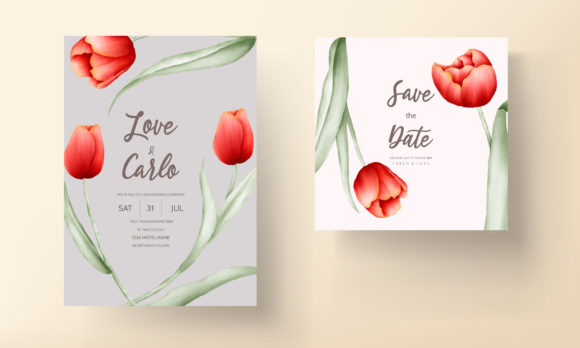
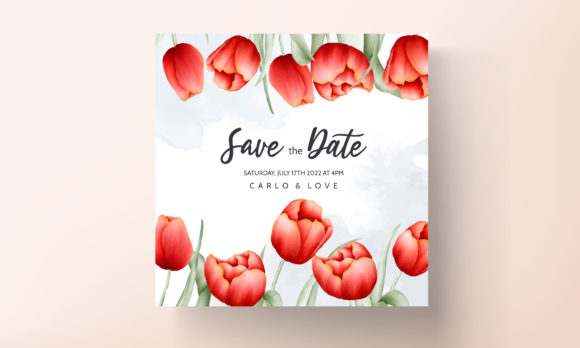
People are drawn to this particular set because it offers a specific aesthetic: colorful floral illustrations of tulips and leaves arranged in an elegant, balanced layout. It promises a result that feels artful and joyful, bypassing the generic feel of many mass-market options. However, the promise of an “Easy to Use and edit” template can lead to a few common missteps if you approach it without a little preparation. Understanding what you’re really buying and how to use it effectively is key to turning that promise into a perfect final product.
Overlooking the File Format Details
A primary point of confusion lies in the included files: Ai file, EPS file, JPEG file. Many beginners download a template, see the JPEG preview, and immediately try to edit that JPEG file in a basic program. This is a fundamental error. JPEGs are compressed, raster images. Attempting to edit text or rearrange elements in a JPEG will result in a low-quality, pixelated mess, utterly defeating the elegance of the original design.
The real value resides in the Ai and EPS files. These are vector formats, editable in professional software like Adobe Illustrator or compatible free alternatives (such as Inkscape or Affinity Designer). Vector graphics are scalable; you can resize them infinitely without any loss of quality, which is essential for printing invitations at various sizes. Before you even download the Elegant Wedding Card Set Tulip Flower, you must confirm you have access to software that can open and edit these .AI or .EPS files. If you don’t, the template’s core functionality is lost.
Assuming Customization Means Unlimited Redesign
Another common misunderstanding is the scope of “Customizable Text Color.” The template is designed for text customization—changing the names, dates, venues, and colors of the existing text elements. However, some users try to radically alter the illustration itself, moving the tulips, changing their colors, or adding entirely new complex graphics. This often leads to a cluttered, unbalanced design that clashes with the original artist’s composition.
A better approach is to respect the template’s intrinsic layout. Use it as a beautifully constructed foundation. Focus your customization efforts on the text and perhaps subtle adjustments like adjusting the overall background hue if the file structure allows. This ensures the professional elegance remains intact. For example, instead of trying to draw a new flower into the scene, you could simply change the text color to a shade that complements the existing tulip illustration, creating a cohesive and personalized look without undermining the design integrity.
Failing to Check Print Specifications
A critical, often overlooked step happens after editing but before printing. You’ve customized your text, saved your file, and sent it to a printer or uploaded it to an online printing service. Without checking a few key details, the result can be disappointing. First, color mode: digital designs often start in RGB (for screens), but professional printing requires CMYK. If you print an RGB file, the colors, especially the vibrant tulips, may print duller or differently than you see on your monitor. Second, resolution and bleed: when saving your final file for print (likely as a PDF or high-quality JPEG from your edited vector file), ensure it’s at high resolution (300 DPI) and, if the design has any background color reaching the edge, includes a printer’s bleed area to avoid unwanted white borders.
Always request a physical proof from your printer when possible. Viewing a sample on paper is the only true way to evaluate color and quality. This simple step prevents costly reprints and ensures the Elegant Wedding Card Set Tulip Flower translates from screen to paper with the beauty you intended.
Neglecting to Personalize Beyond the Text
While the template handles the visual design, the words you insert carry equal weight. A mistake is to treat the text fields as mere data entry, using overly formal or generic phrasing. The design is elegant and floral, which can support a range of tones—from traditional to warmly informal. Match your language to your design. For a birthday party using this template, you might opt for a more playful, celebratory wording than for a wedding. The synergy between your custom text and the template’s art elevates the entire piece.
Furthermore, consider the entire stationery suite. This set is likely designed as a main invitation. Think cohesively about other items: ceremony cards, RSVP cards, thank you notes. You might not use the same template for all, but ensure a complementary color scheme and style. A disjointed set, where the invitation is elegant floral and the RSVP card is a stark minimalist design, feels haphazard to guests.
Not Leveraging the Template for Professional Projects
Freelancers, small business owners, and marketers sometimes overlook the utility of such templates for client work. The Elegant Wedding Card Set Tulip Flower isn’t only for personal use. If you’re creating invitations for a client, using a high-quality, legally licensed template like this is a efficient, cost-effective starting point. The mistake here would be failing to properly license or attribute the template according to its terms, or presenting a barely-modified template as wholly original bespoke work.
The better, ethical approach is to use the template as a robust foundation. Customize it significantly for your client—change colors, layouts within the file’s structure, and text—and then combine it with other unique elements you create. This adds value for your client while respecting the original design asset. It allows you to offer a higher-quality product faster than designing completely from scratch, improving your service’s efficiency and satisfaction.
Before making a final decision to use this template, pause and do a quick audit. Do you have the appropriate software to edit the Ai or EPS file? Does the colorful tulip aesthetic align with your event’s tone and your personal or client’s brand? Have you read the license terms to understand usage rights, especially for commercial projects? And finally, have you planned your print process, including budget for quality paper and a reliable printer?
When approached with this practical understanding, the Elegant Wedding Card Set Tulip Flower transforms from a simple download into a reliable partner in your planning process. It provides the structure that prevents design anxiety, offers the beauty that impresses your guests, and delivers the flexibility that makes your important event feel uniquely yours. By avoiding these common pitfalls, you ensure the first impression of your celebration is as flawless and joyful as the event itself.